WhatsApp Business Auto Reply: 3 Levels, From Basic to AI
Contents
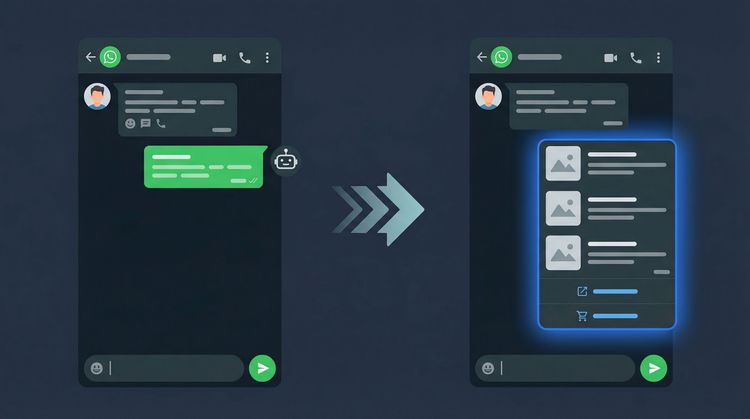
WhatsApp Business auto reply comes in three levels. Level 1 is free in the WhatsApp Business app: a greeting message and an away message. Level 2 is menu and keyword flows on the WhatsApp Business Platform. Level 3 is AI auto reply that answers from your shop's catalog, understands free-form chat and can take the order. Which fits depends on two things: how often your chats get a late reply, and whether those chats usually end in an order.
The 3 Levels of WhatsApp Business Auto Reply in One Table
| Level 1: Built-in features | Level 2: Menu flows | Level 3: AI admin | |
|---|---|---|---|
| What you need | WhatsApp Business app | WhatsApp Business Platform + a provider | WhatsApp Business Platform + an AI provider |
| What it answers | Greetings and opening hours | Questions that are in the menu | Free-form questions, based on your shop's data |
| The customer has to | Wait for the admin | Tap a button or type a keyword | Chat as usual |
| Can it create an order | No | Depends on the flow | Yes, if it is set up through to checkout |
| Good for | Chat volume you can still handle yourself | The same few questions over and over | Shops where chat is already the main checkout counter |
These three levels are not a ladder you have to climb one step at a time. Plenty of shops are fine at Level 1, and plenty jump straight to Level 3.
One Buyer Chat, Three Levels of Reply
This is an illustration, not a real shop conversation. Say a buyer sends this message at night, after the admin has gone home:
"kak yg biru msh ada ukuran M ga? kalo ke bekasi brp ongkirnya"
In plain English: "Is the blue one still available in size M? How much is the ongkir (shipping cost) to Bekasi?"
| Level | What the buyer sees | The result |
|---|---|---|
| 1. Built-in | "Thank you, we open again tomorrow at 09:00." | The buyer waits overnight. The stock and shipping questions go unanswered. |
| 2. Menu flow | "Choose: 1 Catalog, 2 How to Order, 3 Contact Admin." | The question does not fit any button, so the buyer picks "Contact Admin" and is back in tomorrow's queue. |
| 3. AI admin | The AI checks stock for the blue variant in size M in the catalog, then calculates shipping to Bekasi. | The buyer gets an answer right away, without waiting for the admin. If they say "I'll take it", the order can move on to a payment link. |
Level 3 can only answer like this if the catalog (variants and stock) is filled in. If the data has gaps, the AI hands the chat to the admin instead of making something up.
How Each Level Works
Level 1: The Free Way to Auto Reply on WhatsApp Business
Meta's WhatsApp Business app already has basic automated messages: a greeting message, an away message, quick replies, labels and a catalog. The feature list is on the WhatsApp Business resource page, accessed 28 September 2026.
To set it up, go to the Tools menu (Alat) in the app:
- Greeting message. Sent automatically to customers who start a chat. Write 2 to 3 sentences: a hello, what they can ask about, and where your catalog is.
- Away message. Set the schedule to match your opening hours. Always say when the chat will be answered, for example "tomorrow from 09:00".
- Quick replies. Save answers to frequent questions, then pull them up inside a chat. Make one for your price list, one for how to order, one for your bank account details and one for shipping costs.
One thing people often get wrong: quick replies are not auto replies. The admin still has to open the chat and pick each reply by hand. Of the features above, only the greeting message and the away message run on their own, and they say the same thing to everyone.
Level 2: Menu Flows and Keywords
Through the WhatsApp Business Platform (often called the WhatsApp Business API), a third-party provider can build automated flows for you. Customers get option buttons such as "Catalog", "Check Price", "How to Order" and "Contact Admin", or type a set keyword to get a prepared answer.
The upside: common questions get answered without an admin, 24 hours a day.
The limit: the flow is rigid, as the sample chat above showed. Customers go around in circles in the menu, pick "Contact Admin" and end up back in the same queue.
This is what people used to call a "WhatsApp bot for online selling". It still makes sense if the questions your shop gets really are uniform, such as schedule info or status checks.
Levels 2 and 3 always come with two layers of cost: the provider's fee, and Meta's message fees, which follow Meta's policy. The breakdown is in the WhatsApp Business API pricing guide. There is also a timing rule, WhatsApp's 24-hour window, that often makes follow-up messages fail to send.
Level 3: AI That Replies Automatically From Your Shop's Data
At this level, customers don't have to learn how to chat with your shop. They type the way they always do, typos and abbreviations included, and the AI picks up what they mean.
It differs from Level 2 in three ways:
- Answers come from your shop's data. Prices, variants and stock come from the catalog, everything else from the FAQ you fill in. If the answer is not in the data, the chat goes to the admin instead of being made up.
- It can carry on to the order. If it is set up through to checkout, the AI collects the order details, calculates shipping and sends the payment link. The full flow is covered in the article on WhatsApp AI that takes orders and payments.
- It knows when to step aside. Complaints, requests to talk to a person, and questions outside the shop's data are passed to the admin, and the shop gets a notification.
Admin Canggih works at this level. The page on auto replying to WhatsApp chats from your catalog and FAQ explains how it works, including its limits: the AI does not understand voice notes yet, and when the AI reply quota runs out, the AI stops replying until the quota is adjusted. The human handoff page explains when a chat goes to a person.
What to Automate, and What Not To
Auto reply is most useful for questions whose answer is already in your data. Anything that needs a decision or empathy is safer in the admin's hands.
| Type of chat | Automate? | Why |
|---|---|---|
| Price, variants, stock | Yes | The answer is in the catalog |
| Opening hours, address, how to order | Yes | The answer is the same for everyone |
| Shipping cost to the buyer's address | Yes, at Level 3 | It needs a calculation, not fixed text |
| Payment link | Yes, at Level 3 | The amount must match the order recap |
| Complaints, returns, damaged goods | No, hand to the admin | Needs a decision and empathy |
| Special price negotiation, wholesale orders | Hand to the admin | You decide the price |
| Customer asks to talk to a person | Always to the admin | Don't trap them in a menu |
This table doubles as a setup checklist. If a "yes" row has no data in your catalog or FAQ yet, auto reply at any level will only give half answers.
How to Choose the Right Level for Your Shop
Answer these four questions honestly:
- Do some chats only get answered the next day? If that happens often, Level 1 is not enough, because the away message only says "we'll reply later".
- Are the questions uniform or all over the place? Uniform questions fit Level 2. Varied ones (variants, sizes, shipping to a specific city) fit Level 3 better.
- Do your chats end in an order? If so, an auto reply that only answers without creating the order will pile work onto your admin.
- Do you run ads that send people to WhatsApp? You have already paid for every chat that comes from an ad. A chat answered late is a wasted click.
If most of your answers are "yes", also read our guide to the WhatsApp AI sales agent to see an AI admin that sells, not just answers.
Common Auto Reply Setup Mistakes
- A greeting message that is too long. Nobody reads three paragraphs. 2 to 3 sentences is enough.
- An away message with no time. "We are currently unavailable" leaves customers unsure whether to wait half an hour or overnight.
- Stale info. Prices went up but the quick reply still shows the old price. A wrong auto reply is worse than none.
- A menu with no way out. At Level 2, always offer the option to chat with an admin, and make sure someone is actually on it.
- AI without data. At Level 3, gaps in the catalog and FAQ mean more chats get passed to the admin. Tidy up your data first.
What to Do Next
Start with Level 1 today, for free. If chats are often answered late and many of them end in an order, consider Level 3.
Prices for each Admin Canggih plan are on the Admin Canggih pricing page, and Meta's message fees are charged separately under Meta's policy. Want to see how it differs from a plain auto reply? Try the free demo on WhatsApp, or read how Admin Canggih works.
FAQ
How do I set up auto reply on WhatsApp Business?
In the WhatsApp Business app, open the Tools menu (Alat), then set up the greeting message and the away message. Both are sent automatically. For more specific answers, save quick replies and pull them up in a chat, but those are still sent by hand by the admin.
Which AI tool can auto reply to WhatsApp Business chats and answer specific questions?
The greeting and away messages in the WhatsApp Business app are fixed text. To answer specific questions like variant stock or shipping costs, you need a Level 2 or Level 3 service, as described above, which connects to the WhatsApp Business Platform. An AI admin (Level 3) answers from the shop's catalog and FAQ, and passes the chat to the admin when the answer is not in the data.
What is the difference between auto reply, a WhatsApp bot and an AI admin?
Built-in auto reply sends the same message to everyone. A WhatsApp bot is usually a set of menu and keyword flows. An AI admin understands free-form chat, answers from the shop's data, and can carry on through to the order and the payment link.
Can I auto reply on WhatsApp without the WhatsApp Business API?
Yes, with the WhatsApp Business app: the greeting message and the away message run automatically without the API. But they are fixed text. The menu flows and the AI admin covered in this article run on the WhatsApp Business Platform.
Is WhatsApp auto reply safe from getting banned?
Use the official features or Meta's WhatsApp Business Platform, not modified apps or automated WhatsApp Web. Even so, a business number still falls under WhatsApp's policies, so it can still be banned if those policies are broken.
Do customers feel less looked after when replies are automatic?
What usually annoys customers is a menu that goes in circles or answers that miss the point, not the automation itself. Accurate, fast answers, plus a way through to the admin for complaints or requests to talk to a person, keep customers feeling looked after.
Do I have to change my shop's WhatsApp number to use Admin Canggih?
You can keep using your shop's current number. Chats that need a person, such as complaints, are passed to the shop's admin.
How long until this AI auto reply is running?
Once the Canggih team receives your catalog and shop rules, Admin Canggih goes live in under 24 hours. Setting it up yourself is free. If you would rather have the Canggih team set it up end to end, the optional Express Integration service costs Rp 1,000,000.
Can auto reply work for Instagram DMs too?
Yes, with Admin Canggih, but only on the Business and Growth plans, which include Instagram DM bundled with WhatsApp. The Starter plan does not include it, and there is no Instagram-only plan. Need something outside that? Ask the Canggih team on WhatsApp.
How much does it cost to move from a basic auto reply to AI?
It depends on the provider and your chat volume. For Admin Canggih, the smallest plan, Starter, costs Rp 1,500,000 per month (excluding VAT, or PPN) with a quota of 1,000 AI replies, and the other plans are on the Admin Canggih pricing page. Meta's message fees are paid straight to Meta.
This article was written by the Canggih.AI team. Curious how your shop's chats would be answered at Level 3? Chat with us on WhatsApp or follow @canggihai_official.